Notice: Function _load_textdomain_just_in_time was called incorrectly. Translation loading for the wp-plugin-mojo domain was triggered too early. This is usually an indicator for some code in the plugin or theme running too early. Translations should be loaded at the init action or later. Please see Debugging in WordPress for more information. (This message was added in version 6.7.0.) in /home3/kevin48/public_html/best-cheap-3dprinters.com/wp-includes/functions.php on line 6131

Warning: Cannot modify header information - headers already sent by (output started at /home3/kevin48/public_html/best-cheap-3dprinters.com/wp-includes/functions.php:6131) in /home3/kevin48/public_html/best-cheap-3dprinters.com/wp-includes/feed-rss2.php on line 8
Quality of 3D Printing Archives - Best Cheap 3D Printers http://best-cheap-3dprinters.com/category/quality-of-3d-printing/ Sat, 21 Apr 2018 05:19:45 +0000 en-US hourly 1 https://wordpress.org/?v=6.9.4 First Layer, The Foundation Of Your 3D Printing https://best-cheap-3dprinters.com/first-layer-the-foundation-of-your-3d-print/ https://best-cheap-3dprinters.com/first-layer-the-foundation-of-your-3d-print/#comments Sun, 05 Nov 2017 05:58:13 +0000 http://best-cheap-3dprinters.com/?p=4219 First layer is the foundation of every 3D printed part. You can imagine what happens to a building with a bad foundation! Choosing the appropriate settings for the first layer of our model not only saves the part from destruction … Read More

The post First Layer, The Foundation Of Your 3D Printing appeared first on Best Cheap 3D Printers.

]]>

First layer is the foundation of every 3D printed part. You can imagine what happens to a building with a bad foundation! Choosing the appropriate settings for the first layer of our model not only saves the part from destruction but also is vital for its final quality.

Now let’s get down to the business and discuss this vital factor …


Some Symptoms and their resolutions

In the following video, doodaddoes you tube channel discusses about some first layer symptoms , causes and their solutions. The following diagram shows a glossary of what he has explained.

You can visit posts about E-Step and Resolving The Mesh Errors, if you need more information about these subjects. 

First Layer Issues (Symptoms, Causes and Resolutions)


Before doing anything please just make sure :

  • the temperatures of the nozzle and bed are set correctly 
  • the bed is in good working order or clean it

Now enjoy this interesting and helpful video…
 

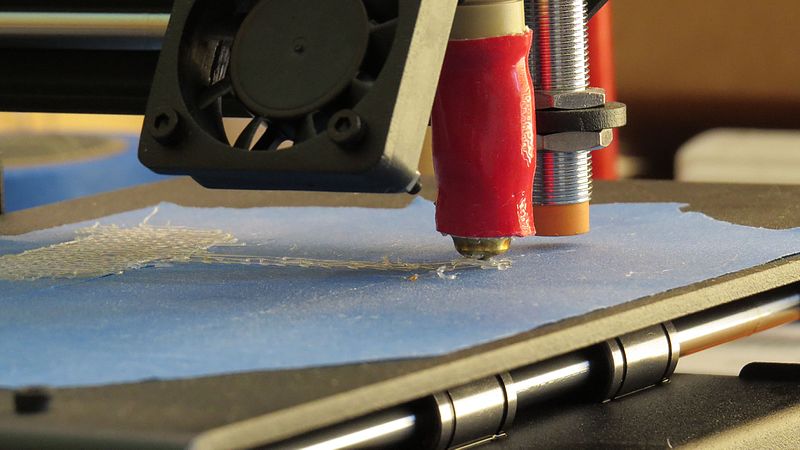
First Layer Settings On CURA Slicer

Settings In The Slicer For The Best First Layer Quality 

In the following video,  Maker’s Muse You tube channel is discussing a number of the parameters that we can tweak in our Slicer Software to improve the quality of the the first layer. Among the different parameters Angos is focusing on the following parameters:
  • First Layer Settings ( height, speed and width ( the amount of material feed))
  • Cooling Fan Speed settings for the first layer
  • Using Skirts / Brims and Rafts

The settings he is showing is related to Simplify 3D software and the same settings can also been found on CURA software which is free. This image is related to CURA ( Version 15.04 )


Some Useful Links
3D Print First Layer

Print Quality Troubleshooting Guide

Repair Your File To Create Seamless 3D printed parts

Do You Feed Appropriate Amount of Material Into Your 3D Printer?

3D Printing Multiple Processes in Cura


Bottom Line

Now we have moved another valuable step forward in 3D printing knowledge. Knowledge is power and now we are more powerful. We can save a lot of time, material, energy and money with just considering the above points before starting to print. 

The post First Layer, The Foundation Of Your 3D Printing appeared first on Best Cheap 3D Printers.

]]>
https://best-cheap-3dprinters.com/first-layer-the-foundation-of-your-3d-print/feed/ 13008
Repair Your File To Create Seamless 3D printed parts https://best-cheap-3dprinters.com/create-seamless-3d-printed-parts/ https://best-cheap-3dprinters.com/create-seamless-3d-printed-parts/#comments Fri, 13 Oct 2017 07:34:56 +0000 http://best-cheap-3dprinters.com/?p=4104 Find the issues and resolve them before they happen!  Avoid the defects before they occur.  Isn’t it exciting? In search for the practical examples of 3D printing softwares, I found a number of really valuable resources, websites and Youtube videos. … Read More

The post Repair Your File To Create Seamless 3D printed parts appeared first on Best Cheap 3D Printers.

]]>

G-code preview

Find the issues and resolve them before they happen!  Avoid the defects before they occur.  Isn’t it exciting?

In search for the practical examples of 3D printing softwares, I found a number of really valuable resources, websites and Youtube videos. I am really excited to share them with you in this and future upcoming posts. Make sure to follow these series because they are full of important, vital and valuable practices and examples.

The focus of this post is on using 3D printing softwares to check, find and resolve the defects on your 3D models before you print the parts. I am sure, you can imagine the importance of this subject in creating seamless final parts and saving a lot of time, material, energy and money.


Check G-code Overview for Overhangs and Holes

Let’s start with a very interesting and helpful video from Makers Muse  Youtube Channel.

In this video Angus explains how we can use a G-code preview of a complicated sliced model:

  • for a primary check to see if the overhang supports on a model are enough and suitable. The automatic support generation of a software can’t always detect all the thin overhangs and some parts of the model might start printing in the mid-air, creating a mess and resulting a failed print. So a layer by layer initial inspection of the model helps us add more supports in the required points. The manual support creation of Simplify3D is really helpful in this regard.
  • to examine the big areas with low slopes. This can cause the printed layers to fail to cover the area and create holes in the final part.


Now let’s enjoy watching this interesting video ….


Most Common Mesh Errors and How to Fix Them Using Meshmixer

An STL file is made up of a Polygon Mesh. This mesh is actually a group of triangles that define only the external surfaces of your part. Your slicer decides on how to arrange these triangles to make the mesh more similar to the original part. The more complex your model is, the more mesh errors can be created in this simulation. 

The following video from Formalab is one of the most helpful videos I have ever seen. Many thanks to Jordan ( from Formalab’s customer success team ) who is helping us to understand , find and resolve some of the most important errors in STL files. This way we can avoid a lot of the the 3D printing issues before they happen in the real parts and save a lot of time, material and money.

He focuses on the following important mesh errors and their resolution by Meshmixer:

  • Missing Faces
  • Reverse Faces
  • Interior Faces 
  • Zero Thickness
  • Unattended Fastening

Now relax and enjoy the video … 

And then make a note from it…..


Use Makeprintable App on Thingiverse To Resolve The Mesh Problems

This new and helpful feature in Thingiverse helps us find the common mesh errors like non-manifolds, intersecting geometries, thin walls and other issues.


Install Makeprintable App on Your Sketchup

Isn’t it excellent? We can now install this app on our Sketchup and use it to analyse the common model errors and resolve them. 

Enjoy this video and make sure to use this excellent opportunity…..


More Resources and Websites

Definition of the common errors


Bottom line

We discussed the following 4 exciting subjects that with no doubt will increase our power in creating seamless 3D printed parts.

  • Checked the G-code overview for overhang supports and issues
  • Examined the models against common Mesh Errors using Meshmixer
  • Introduced Makeprintable app in Thingivers.com website and used it to check the models against mesh errors
  • Found how to install Makeprintable app on our Sketchup and make this free software more powerful

At the beginning of this post I told that I am excited to share these videos with you and now you know why.

In the future posts I will share more videos and resources on interesting and helpful subjects.

See you there, very soon!!

The post Repair Your File To Create Seamless 3D printed parts appeared first on Best Cheap 3D Printers.

]]>
https://best-cheap-3dprinters.com/create-seamless-3d-printed-parts/feed/ 19379
Make Your 3D Prints Shiny and Beautiful! https://best-cheap-3dprinters.com/3d-printing-smoothing/ https://best-cheap-3dprinters.com/3d-printing-smoothing/#comments Sat, 27 May 2017 23:14:06 +0000 http://best-cheap-3dprinters.com/?p=3608     In order to print a beautiful and shiny part you don’t need to have an expensive 3D printer with high resolution.  Even with higher resolutions the quality of a 3D printed part is limited and the post processing would … Read More

The post Make Your 3D Prints Shiny and Beautiful! appeared first on Best Cheap 3D Printers.

]]>


Smooth 3D Prints with Acetone Vapour


In order to print a beautiful and shiny part you don’t need to have an expensive 3D printer with high resolution.  Even with higher resolutions the quality of a 3D printed part is limited and the post processing would be a requirement.

Using the techniques introduced in this post, you will enjoy creating the parts with really excellent finish and appearance disregarding printing resolutions. And more importantly you will save a lot of printing time, energy and money by avoiding the time consuming high resolution 3D printing.

And here are the methods….


3D Printing Smoothing

This page focuses on following 3 different smoothing methods :

  • Smoothing using Solvent , Primer and Colour 
  • Using Acetone Vapour for smoothing
  • Smoothing using Epoxy 

We should keep in mind to consider safety precautions especially in relation to the first 2 methods because they use highly inflammable materials as solvents. 

The important benefit about all these methods is that you are transferring the time consuming steps of part manufacturing from the 3D printer to the post processing activities. In other words you don’t need to spend a lot of time printing the parts with minimum layer thicknesses for better appearance qualities. You just print quickly with minimum quality and then improve it with the above methods.


Smoothing using Solvent , Primer and Colour 

 This method uses 3 following easy steps:

  • Use solvent to remove the uneven high points of the part. ( Remove the hills )
  • Use primer to cover the low points of the part. ( Fill the valleys )
  • Cover the part with your favourite colour and coating to create the beauty in your parts

CAPINC Youtube Channel has prepared this really interesting and helpful video.  We don’t intend to repeat the words. Just enjoy the video and use it to create beautiful parts. 


Smoothing using Acetone Vapour

It’s unbelievable! With some really easy steps and ordinary tools, we can create much more beautiful parts. Thanks very much from Luke from  DIY Perks Channel for this really helpful and interesting video. Watch, enjoy and use it!

Don’t forget to consider the safety precautions. These actions include but not limited to having a ventilated area, wearing masks and gloves.

Some Important Point!

  • Avoid over smoothing because it could remove some important details.
  • Smoothing occurs during the drying process so make sure you remove the cover nearly half way before the completion and let the part dry. 
  • Smoothing best works when you use filaments with good quality. Using low quality elements may have adverse effects and less effective smoothing.


Smoothing using Epoxy 

Thanks to  TechWizTime youtube channel for preparing this interesting and helpful video. In this video you will see how to use epoxy resins to perform the smoothing process on your 3D printed parts.  

The epoxy is much less combustible than Acetone and this could be an advantage over the Acetone. It is not odorless but better than Acetone. You also need to use a ventilated area to work with it.

It takes 12 hours to completely fix. Acetone vapour is much faster and takes around 2 hours.

In Acetone vapour method you move the material on the surface of the part but in Epoxy resin method you add some material to the part. So the design considerations to obtain correct dimensions on the final parts could be different.

Now sit back and enjoy this video.


Bottom Line

Success in 3D printing doesn’t necessarily need an expensive machine. With some really easy techniques you can create stunning beauties. We just need to be open , learn and practice. So let’s start now!

All the above smoothing processes add or remove materials to or from your models and for dimensional accuracy you need to consider this fact in the design of your 3D model. 

Also note that with the first two methods ( which include solvent ) the quality of the filament affects the smoothing process. In other words you need to use material with good quality for the best result. The epoxy method is not sensitive to the quality of the material. Why?…

Thank you very much for accompanying us in this post. Please let us have your comments to enrich it.

We invite you to visit the other posts of this website as well.


Useful Links

Cold Acetone Vapour Finishing for 3D Printing

Acetone Welding and Smoothing 3D Printed ABS


The post Make Your 3D Prints Shiny and Beautiful! appeared first on Best Cheap 3D Printers.

]]>
https://best-cheap-3dprinters.com/3d-printing-smoothing/feed/ 6616
3D Printing Multiple Processes in Cura https://best-cheap-3dprinters.com/3d-printing-multiple-processes-in-cura/ https://best-cheap-3dprinters.com/3d-printing-multiple-processes-in-cura/#comments Tue, 16 May 2017 07:43:23 +0000 http://best-cheap-3dprinters.com/?p=3537 A Powerful Tool for 3D Printing Experts In this post you will see another advanced technique that is used by the experts in 3D printing. This is a big step towards simplifying a number of important quality settings. You will discover this … Read More

The post 3D Printing Multiple Processes in Cura appeared first on Best Cheap 3D Printers.

]]>

A Powerful Tool for 3D Printing Experts

In this post you will see another advanced technique that is used by the experts in 3D printing. This is a big step towards simplifying a number of important quality settings. You will discover this technique in Cura 15.04 slicer and at the end you will find a shared link to a Youtube video about this feature in Simplify 3D. 

Now fasten your sit belts and get ready for enjoying this interesting, helpful and important feature in Cura.


What is this Tool?

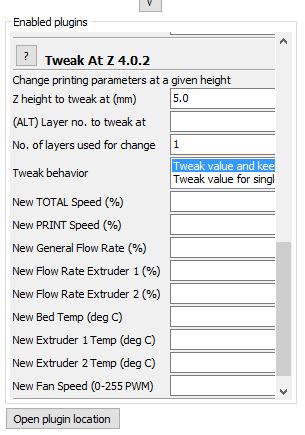
This tool is one of the plugins in Cura. It  gives you the ability to tweak a number of parameters at the same time, to see their interactions and results. The name of this plugin is “TWEAK At Z 4.0.2“.

A number of 3D Printing parameters including Height, Layers, Printing Speed, Flow Rate, Bed Temperature, Extruder Temperate and Fan Speed could be set and tested.

You can define multiple tweak steps and add it to the existing tweak list.

In other words you take more and more control on your 3D printer.

Isn’t it exciting?

Example

This picture shows a setting that makes the printer to print at height 5 mm with following settings and continue to the next defined step for example at height 10 mm:

Printing speed at 80%

Changing the flow rate at 10 mm

Flow rate at 104%

Bed Temperature at 60

Extruder Temperature at 190

Fan Speed at 150 PWM

In the next step which starts at height 10 mm the flow rate has decreased to 102% and rest of the parameters are unchanged.

It continues until the height that you define in the next step.

You are defining step by step for your machine what you expect it to do. 

Can you imagine the amount of help that you can get from this single plugin?


How this tool helps you

In previous posts about Fine Tuning Temperature Against Stringing and Setting The Material Flow Rate Of Your 3D Printer , you needed to define several steps to test and observe the behaviour of the plastic filament.

These are two of the most important settings that would provide the best performance of your machine regarding quality of the printed parts, reducing the waste of material and saving printing time, energy and expense.  

This plugin is the main tool for these vital settings and I am sure you can imagine its importance.

The intention in this post is not to discuss the details of this plugin. It’s something that we need to go on and tweak to learn by action.

TAOW youtube channel has presented the following interesting and helpful video on some important settings using this plugin.


Cura menu when it is opened for the first time.

Where to find “TWEAK At Z 4.0.2” in Cura

When you open the Cura first you may find its menu like this picture and ask yourself where I can find the above mentioned menus and plugins?


Don’t worry, it’s very easy. You just need to click on “Expert” tab and then “Switch to full settings…”.

Then you will see the Full settings menu and Plugins is one of the tabs. There you can find “TWEAK At Z 4.0.2”.  

Switch to Full Settings

Plugin tab in advanced settings menu


Using Multiple Processes in Simplify 3D

Angus from Maker’s Muse Youtube Channel has used “Multiple Processes” in Simplify 3D  to reduce the printing time. He has used this powerful tool to print a part with different infill percentages to reduce the total printing time from 28 hours to 18. 

Isn’t it exciting?

Now enjoy watching this interesting and useful video. 


Bottom line

Multiple Processes in Calibration Towers

Successful people in each branch of science are the ones who know and use the powerfu

l tools in that field. Now you are familiar with one of the important and strong tools in 3D printing. Do you want to add your power? So what are you waiting for? Start to experience and gain knowledge.

We saw some examples about using this tool to facilitate a number of settings to produce quality parts and reduce printing time. Let’s think and use our creativity to find more applications for “Multiple Processes”.

Can you imagine how this tool can simplify the printing of the following “Extruder Temp Calibration Tower”?

http://www.thingiverse.com/thing:915435

http://www.thingiverse.com/thing:729703


Congratulations on another effective step towards the success in 3D Printing world! and…

See you on the next post!


The post 3D Printing Multiple Processes in Cura appeared first on Best Cheap 3D Printers.

]]>
https://best-cheap-3dprinters.com/3d-printing-multiple-processes-in-cura/feed/ 35695
Setting The Material Flow Rate Of Your 3D Printer https://best-cheap-3dprinters.com/calibrating-material-flow-rate-3d-printer/ https://best-cheap-3dprinters.com/calibrating-material-flow-rate-3d-printer/#comments Tue, 25 Apr 2017 08:08:05 +0000 http://best-cheap-3dprinters.com/?p=3433 In the posts about E-step Setting , we discussed on how to adjust the the length of filament that is pulled in by the extruder. It is one of the important settings for having a high quality 3D printing. It is necessary … Read More

The post Setting The Material Flow Rate Of Your 3D Printer appeared first on Best Cheap 3D Printers.

]]>

In the posts about E-step Setting , we discussed on how to adjust the the length of filament that is pulled in by the extruder. It is one of the important settings for having a high quality 3D printing. It is necessary but not enough.

In this post we will learn about calibration of material flow rate in the 3D printers. In fact a high percentage of the 3D printing defects is related to incorrect Flow Rate setting. It affects everything from model strength to surface finish. It is one of the keys to the success of most successful experts in 3D printing.


Why is material flow rate so important in 3D printing process?

This part needs 17.15 cm cubed of material. Not less and not more!

Suppose you want to print this part and use Cura as your slicing software. It is showing that the part needs 7.13 meters of 1.75 mm PLA filament to be printed. 

Calculate the required material volume as:


Here is the important point !

The software considers the  filament diameter ” d ” as constant while it really isn’t. Depending on the production accuracy of the manufacturer the filament diameter will change with a tolerance range around the nominal diameter. ( 1.75 mm )

Over Extrusion

So when you print the above object you will not print exactly 17.15 cm3 .

Under Extrusion

Some times much less and some times much more, and this causes Under Extrusion or Over ExtrusionThese are two of the main issues that make the result of our 3D printings ugly.

In under extrusion you face with issues like unwanted gaps, holes and lack of material. And in over extrusion you will see the the layer overlaps , extra materials ,out of form features and…


How to set the material flow rate?

Flow Rate setting Cura 2.4.0

The first step is to obtain an average diameter of the new filament by doing a number of measurements along the new roll of filament.

The main logic  

You need to find the flow rate (percentage ) for each roll of new filament and set it on your slicer or directly into your machine. Finding this factor is based on a planned trial and error in which you choose a model and try to print it with different flow rates to find the best result.

For example you start with flow rate of 104%. If the printed part is over extruded then you choose a less flow rate for example 100%. If then it is under extruded so the flow rate should be something between 100% and 104%. This time you choose 102% and continue this way to find the best setting based on the best print quality.

You can choose the following model from thingiverse.com:

http://www.thingiverse.com/thing:24238


A very useful Youtube Video

Many thanks to  TAOW youtube channel , I have decided to share this video with you because he has used a very interesting and practical logic to do this important setting.

He prints a 20 mm x 20 mm x 100 mm column starting at 105% flow rate and uses the following decrements to complete the column at 98%. 

h=0-5 mm  / Flow rate = 105%

h=5-10 mm / Flow rate= 104%

h=10-15 mm/ Flow rate= 103% ……

……..

h= 50-55 mm / Flow Rate = 98%


Then he looks at the appearance and quality of the printed column at different heights and chooses the best flow rate. For example if the best printing quality is between h= 15-25 mm then the best flow rate will be at 100-102%.


Now enjoy the video… 


Bottom Line

Congratulations for another big and effective step towards professional 3D printing. Now we know how to prevent two of the major issues that make our printed parts ugly.

We also know that each roll of filament could have a different behaviour regarding the flow rate. You may have done a lot of settings but wondered why the result wasn’t good enough. Now you know that the reason lies behind the flow rate setting. Many of the killing defects are directly related to this setting.

So make sure you do it at least when you use a new brand of material and as ASAP. It’s best to do it for every new roll of  filament.


More videos and resources


Troubleshooting 3d Prints Calibrate Extrusion Rate

Extruder + Flow Rate Calibration

Setting your 3D printer’s extrusion

3D Print Quality Trouble shooting- Simplify 3D 

Troubleshooting Guide to 25 Common 3D Printing Problems

The post Setting The Material Flow Rate Of Your 3D Printer appeared first on Best Cheap 3D Printers.

]]>
https://best-cheap-3dprinters.com/calibrating-material-flow-rate-3d-printer/feed/ 19722
Prepare for Better Non-Supported Overhangs https://best-cheap-3dprinters.com/prepare-better-non-supported-overhangs/ https://best-cheap-3dprinters.com/prepare-better-non-supported-overhangs/#comments Sun, 16 Apr 2017 01:57:25 +0000 http://best-cheap-3dprinters.com/?p=3365 3D Printing, An Exciting Journey! Journey of 3D printing becomes really exciting when you accept the fact that there are a lot of things to learn nearly with every single part that you print. If you embrace the challenges and be … Read More

The post Prepare for Better Non-Supported Overhangs appeared first on Best Cheap 3D Printers.

]]>

3D Printing, An Exciting Journey!

Journey of 3D printing becomes really exciting when you accept the fact that there are a lot of things to learn nearly with every single part that you print. If you embrace the challenges and be eager to learn and experience then you pass a very quick and valuable learning curve towards the point of being an expert in this field. In this post we learn about another really important step towards the parts with much better qualities. This step is Bridge Test …….


3d printing PLA with and without cooling Fans

The Bridge Test And The Logic Behind It

The bridge test has been designed to set the performance of your 3D printing for better overhangs. This test is based on a simple logic. Actually you need to make sure that your printed ( non-supported ) layers don’t find enough opportunity and time to deform or droop because of their weight and low viscosity. You don’t like the printed filament to droop and make ugly shapes like this. Do you?


The Bridge Test

In the following video, Adam has used a model from Thingiverse for performing the Bridge Test.

Watch it and guess what settings he has considered to print this long bridge successfully without supports.


He has used a new configuration for the cooling fans on his 3D Printer. These fans cool down the printed filament quickly below the Glass Transition Temperature before it finds the opportunity to bend down and make the droops or strings. 

But is that all? …….


The Main Factors In Printing Good Non-Supported Overhangs

Logically we should be looking at three main things:

Different Settings and Different Results in Bridge Test

  • Hot End Temperature
  • Cooling Fans
  • Printing Speed

If the hot end temperature and the speed of printing are too high then the printed layer will droop even if you use the cooling fans.  ( Why?)

On the other hand if you set the appropriate temperature and speed you can print complicated overhangs without a cooling fan and support.

Watch the following video to see how  theMINIFACTURE has set the printing speed so low to be able to 3D print a single layer spiral in the air and without supports.

Do you have enough patience to set the speed of your 3D printer so low?

Now you can guess why a cooling fan is used.


3D Printing A Bridge Without Cooling Fans (For ABS Parts)

As discussed on the previous post about Cooling Fans,  it is not advised to use cooling fans for ABS parts. So most of the times we have to set only the speed and temperature for 3D Printing an ABS bridge.

Now watch the following video. Scott has proved in an interesting way that the bridge can be printed just with reducing the speed of printing . Note to the change of speed when printer starts to print the bridge between two columns. You can define multiple processes with different speeds so that when your machine starts printing the bridge uses a lower one. 


Some issues with Bridge Test

When you do the bridge test you will see that the bottom face of the bridges are like straight strings that are not stuck together. That’s because each layer of printed material cools down quickly and will not stick together to make a continuous shape.

But don’t worry because that happens just for the bottom layer and upper layers will stick to the lower ones and create a continuous texture. That’s why you see that the top layer doesn’t have the Noodle Texture.


Bottom line

3D printing softwares mostly consider supports for printing long horizontal overhangs. Some design considerations also need to be considered . If you want to print theem without a support or design changes then steps in this page will help you a lot. You can even use the combination of these techniques.

Congratulations for another valuable steps towards advanced 3D printing.

Don’t doubt and act. Embrace the challenges and you will learn a lot with each one.


More resources and Links

Overhang test samples on Thingiverse

Customizing Support Structures in Simplify3D

MakerBot Discover: Support Material 

3DP Test Probes


The post Prepare for Better Non-Supported Overhangs appeared first on Best Cheap 3D Printers.

]]>
https://best-cheap-3dprinters.com/prepare-better-non-supported-overhangs/feed/ 16706
Improve The Quality Of 3D Printing By Cooling Fans https://best-cheap-3dprinters.com/improve-quality-3d-printing-cooling-fans/ https://best-cheap-3dprinters.com/improve-quality-3d-printing-cooling-fans/#comments Sun, 16 Apr 2017 00:09:51 +0000 http://best-cheap-3dprinters.com/?p=3312 A Mindset That Makes You Powerful In 3D Printing 3D printing is full of fun and fulfilment when you open your mind to the experiences of experts in this field. In this post you will look at a very important … Read More

The post Improve The Quality Of 3D Printing By Cooling Fans appeared first on Best Cheap 3D Printers.

]]>

A Mindset That Makes You Powerful In 3D Printing

3D printing is full of fun and fulfilment when you open your mind to the experiences of experts in this field. In this post you will look at a very important issue and its resolution especially for PLA parts.


What’s The Issue?

Low cooling speed of extruded plastic will cause considerable  quality, appearance and accuracy issues for the 3D printed parts. It’s because each layer doesn’t find enough time to cool down below the Glass Transition Temperature before the next layer is deposited on it. As a result the lower layer will be soft and not be able to support the next layer which causes distortions in the final part.


A Very Helpful Video About The Solution

Below you will watch a video on the important subject of Cooling Fans and their effects on the quality of your 3D printed parts. Many thanks to Tech2C people who have prepared this helpful and excellent video. The points mentioned in this video will save you a lot of time, money and effort, and help you step inside the wonderful world of 3D printing experts.

I don’t intend to repeat the words but reading the following questions before and after watching the video will help you grasp much more from it. Write down your answers on a piece of paper or in your note book and keep them for your future use.

And here are the questions….

Using Cooling Fans for PLA

Cooling fans on 3D Printer Head

How many fans he is using on his 3D printer head?

What is each of these fans facing to?

Why is the print head fan mandatory? What happens if this fan stops working?

Where do the side fans face?

Describe what happens to the extruded plastic layers when side fans are on.

What happens to the extruded plastic layers when side fans are off. ( What will be the issues with 3D printed parts in this situation?)

What is the material and size of the calibration cubes he is printing?

Describe what happens to the shape of the cube when the side fans are off? (Can you use these cubes to calibrate your 3D printer?)

What happens to the shape of the cube when the side fans are on? 

What do the measurements on two cubes prove to us?

Different configurations of using the cooling fan to blow at hot end

Describe the Marvin face when it is printed with the fans off?

What is the Glass Transition Temperature of PLA?

Cooling fans assist the plastic to …. down below  …… before the next layer gets deposited.

Do you Use Cooling Fans For ABS?

What is the glass transition temperature of ABS? 

Does ABS need to cool down as far as PLA?

Can ABS create ugly parts without cooling fans?

Can you always use cooling fans with ABS parts? Why?

What happens when you use cooling fans with ABS parts?

Why is he using a 50% speed for the cooling fans when he tries to print the Marvin face with ABS?

How is the quality of the printed ABS part?

Is it totally forbidden to use cooling fans for ABS parts?


Now watch and enjoy the Video


Cooling fans blowing at both sides of the hot end


Bottom Line

If your 3D printer hasn’t got side cooling fans then you are missing out a lot of quality of your PLA  printed parts. So get ready to install them on either side of your printer head to blow at printed plastic layers and save the quality of your 3D printed pieces.

You will save a lot of money, material and effort, and even do more effective calibrations on your machines by following this step. So what are you waiting for?!!

Congratulations on taking another effective step towards expert 3D printing. 

See you on the next post about 3D printing long bridged parts.


The post Improve The Quality Of 3D Printing By Cooling Fans appeared first on Best Cheap 3D Printers.

]]>
https://best-cheap-3dprinters.com/improve-quality-3d-printing-cooling-fans/feed/ 12502
Retraction, A Powerful Setting Against Stringing https://best-cheap-3dprinters.com/retraction-powerful-setting-stringing/ https://best-cheap-3dprinters.com/retraction-powerful-setting-stringing/#comments Tue, 04 Apr 2017 08:06:25 +0000 http://best-cheap-3dprinters.com/?p=3247   Settings introduced in this page are the ones used by successful 3D printing experts. They may take some time and a little bit of material but will save the part quality and a lot of time , material and … Read More

The post Retraction, A Powerful Setting Against Stringing appeared first on Best Cheap 3D Printers.

]]>


Settings introduced in this page are the ones used by successful 3D printing experts. They may take some time and a little bit of material but will save the part quality and a lot of time , material and money.  In fact the key to their success is that they are eager to learn and implement these actions.

In the previous post we discussed how to set temperature to avoid stringing. While temperature setting will improve the parts, there is another action which improves stringing even more, and it is Retraction. It is often necessary to set both Retraction and Hot End Temperature to gain a high quality result with minimal stringing, especially in printing more complicated parts.


What is retraction?

Retraction actually pulls filament a bit back from the hot-end during the non-printing movements of extruder. It relieves the pressure from the back of the filament so that it will not ooze during movement.

Watch this interesting video which shows how a 3D printer performs retraction.

Note how a beautiful pyramid is printed without strings. The filament is pulled back when the machine completes one layer of a column and before it moves to the next position to print the next layer of another column. At the end of the video you see that there will be no retractions when four columns join to complete the pyramid. 


Retraction settings in Simplify 3D

In the next video Angus from Maker’s Muse explains about retraction settings in simplify 3D software. I don’t intend to repeat the words. But the following set of questions summarises the main topics of this interesting video. I suggest you have a look at them before and after watching the clip. 

Here are the questions…

  • What is the definition of Retraction?

    Strings between the columns in 3D printing

  • Is setting the temperature always enough to remove stringing?
  • What are the parameters Angus is setting first? ( Are they retraction amount and speed?)
  • Is the stringing completely removed after these settings?
  • What are the other settings he is doing next? ( To better improve the part against stringing as he calls them advanced retraction settings)
  • What is coast and coasting distance? ( coasting turns off your extruder ( stepper motor ) a short distance before the extruder starts moving to another printing point. This relieves the pressure that is built up inside the nozzle.
  • When should we do Wipe Setting?
  • Are the results different with and without retraction settings?
  • What happens if you do too much retraction? What are some issues that are caused by over retraction?
  • What does he do to improve under extrusion? What parameter he is introducing for this issue?
  • Are you sacrificing printing time for quality? ( It depends! )
  • When should you turn the retraction setting completely off?
  • What does he suggest to reduce stringing in flexible materials?


Watch the video now.


Retraction Settings in Cura

Cura is a free 3D printing slicer software that is prepared by by Ultimaker. Since it’s open sources it is being enriched by the community.

There are comprehensive options to set the retraction in Cura . As you open the software you can see the Print Setup menu. Choose Custom and then click on Material to open the material setup.  You can see that the retraction is activated by default. If you want to print a flexible material you can ( and need to ) deactivate it easily.

You can set Enable Retraction, Retract at Layer Change, Retraction Distance, Retraction Speed and . There is a complete set of parameters that you can tweak for better results.

If you can’t see these items on your menu then you can make them visible at Settings / Configure Settings visibility menu.


Setting On Cura

Retraction Settings On Cura


Bottom Line

We talked about the definition of retraction and its effect in reducing the stringing 3D printing. There are a number of items that will help us improve the parts against this issue. The most important ones are Retraction ( amount and speed ) and Hot End Temperature. To have the best result a combination of these settings need to be done. 

Angus in the second video introduced some advanced settings using simplify 3D software. And in the final part, Retraction settings in Cura software were introduced.

These are some of the settings that successful 3D printing experts use. Do you want to join the experts?

So What are you waiting for?


The post Retraction, A Powerful Setting Against Stringing appeared first on Best Cheap 3D Printers.

]]>
https://best-cheap-3dprinters.com/retraction-powerful-setting-stringing/feed/ 15788
Fine Tuning Temperature Against Stringing https://best-cheap-3dprinters.com/fine-tuning-temperature-stringing/ https://best-cheap-3dprinters.com/fine-tuning-temperature-stringing/#comments Mon, 27 Mar 2017 06:29:36 +0000 http://best-cheap-3dprinters.com/?p=3206 Settings introduced in this page will considerably enhance the quality of your 3D printed parts. It also saves a lot of time, material and money by reducing rework and waste of material. So get ready and enjoy your next step forward … Read More

The post Fine Tuning Temperature Against Stringing appeared first on Best Cheap 3D Printers.

]]>

Settings introduced in this page will considerably enhance the quality of your 3D printed parts. It also saves a lot of time, material and money by reducing rework and waste of material.

So get ready and enjoy your next step forward towards expert 3D printing. 


Why should we prevent stringing?

Stinging picture with courtesy of all3dp.com

You may think, ” I don’t have any issues with stringing. I will trim the strings and make the final part beautiful. Why should I spend some time for this setting?”

That’s OK  but if you want to print more precise parts and in larger quantities then the facts will be different.

Stringing creates and causes:

  • Ugly parts ( that couldn’t sometimes be fixed completely )
  • Rework
  • Waist of material
  • Inaccurate parts especially at trimming and reworking spots


As the quantity and quality of the parts increase the above issues will show more meaning and importance.

Most of the people start 3D printing as a hobby and fine tuning doesn’t seem important to them at the beginning. But as time goes they find themselves in a series of part manufacturing activities that concepts like Time, Material Economy and Quality become completely important. 

Suppose for example, 10 3D printers are working and each one is supposed to manufacture multiple parts for different assemblies, a total of 100 parts. I am sure you can imagine the amount of material, time and effort that would be wasted if we want to do the rework for trimming the strings from the parts.

That’s the beauty of this way. So enjoy this beauty !

Srtinging and 3D printing temperature by thingiverse.com

Most Important Factors

There are a number of settings on your 3D Printer that help you prevent or reduce stringing. The most important ones are Retraction and Hot End Temperature.

We may be unable to avoid strings completely but as this picture shows we may have considerable improvements just by setting the Hot End temperature. So why should we ignore this valuable and effective setting?

In this post our focus is on finding the best temperature settings against this fault.

This beautiful picture (from Thingiverse.com ) is showing how the stringing could increase as the temperature of PLA goes up from 180ºC to 240ºC.

Depending on the type and brand of the material this temperature range may change. So make sure that you do this setting again whenever you change your material.

It takes just a small amount of filament and time. 

How is this setting done?

In the following video Anthony from the “Hot End” youtube channel is showing a very interesting method of doing this setting using ” Processes” feature in “Simplify 3D” software. He has designed a 3D model with 4 columns that are close enough and could show the stringing behaviour easily and effectively.

The logic is that you define a number of processes for your 3D printer in which it prints a 10mm column with a certain temperatures starting from 220ºC. Then the temperature drops for 5ºC and then prints another 10mm column on the previous one.These series of processes continue until you reach a temperature around 180ºC or 190ºC. By looking at the final printed columns you can decide about the optimum Hot End Temperature. 

I hope you enjoy this video and find it helpful.


Bottom Line

Paying attention to settings like this is the key to success of most of the 3D printing experts. With learning and implementing the series of the techniques that will be introduced in this website you will step inside the world of expertise. It takes some time but is absolutely worth. 

Important Resources

https://www.simplify3d.com/support/print-quality-troubleshooting/#stringing-or-oozing


The post Fine Tuning Temperature Against Stringing appeared first on Best Cheap 3D Printers.

]]>
https://best-cheap-3dprinters.com/fine-tuning-temperature-stringing/feed/ 37796
Fine Tuning the Output of 3D Printer with X/Y/Z-Step https://best-cheap-3dprinters.com/fine-tuning-output-3d-printer-xyz-step/ https://best-cheap-3dprinters.com/fine-tuning-output-3d-printer-xyz-step/#comments Wed, 22 Mar 2017 11:38:49 +0000 http://best-cheap-3dprinters.com/?p=3102 In the previous post we discussed the Calibration of INPUT MATERIAL to the Extruder (E-Step). Now let’s focus on X-Step, Y-Step ans Z-Step settings that are absolutely necessary steps in creating beautiful and more accurate 3D printed parts. What are … Read More

The post Fine Tuning the Output of 3D Printer with X/Y/Z-Step appeared first on Best Cheap 3D Printers.

]]>

Easy X, Y and Z-Step setting on Repetier Host.

In the previous post we discussed the Calibration of INPUT MATERIAL to the Extruder (E-Step).

Now let’s focus on X-Step, Y-Step ans Z-Step settings that are absolutely necessary steps in creating beautiful and more accurate 3D printed parts.

What are X, Y and Z-Step?

They refer to setting of Stepper Motors that control the movements of the Hot End along X, Y and Z axes. In other words:

  • X-Step is the number of steps that X-Axis stepper motor turns to move the hot end for 1 mm
  • Y-Step is the number of steps that Y-Axis  stepper motor turns to move the hot end for 1 mm
  • Z-Step is the number of steps that Z-Axis  stepper motor turns to move the hot end for 1 mm


Why are these settings important?

If you intend to have more accurate parts, then this is one of the essential steps. Ignoring these settings may cause some fitting issues when you need to assemble the printed parts. You can imagine what happens when the parts are too loose? What if they can not be assembled? 

Remember that 3D printing is not a high accuracy production method with Micron precision. The printed parts often need rework even you use the best settings.  But you will need much more reworks if you skip these settings.


The setting process is really easy

X, Y and Z Step settings are very similar to E-Step setting that was discussed on previous post.

You need to follow these steps:

  • Read X-Step, Y-Step and Z-Step from the firmware or the control software ( for example Repetier Host )
  • Print a shape ( for example a cube with sizes 50mm X 50mm x 50mm or this shape from Thingiverse.com
  • Let the part gets cold and its shrinkage becomes complete
  • Measure each size. Make sure you don’t include the first layers because they are usually wider.
  • Use the following formulas to calculate the new amount of X, Y or Z-Step:
  • Put the new step in the the machine and print a new sample 
  • Measure the sample and you will see that the sizes are now much closer to 50 x 50 x 50 mm.


The above formulas are obtained from simple proportions and cross multiplications just the same as the one on E-Step post.


Example:

Initial X-Step , Y-Step and Z-Step of your 3D Printer

Suppose you intend to print a cube with sizes 50 x 50 x 50 mm and the X-Step , Y-Step and Z-Step on your 3D printer are as per below table. You have printed the part and the dimensions after cooling down to ambient temperature are:

X= 47mm

Y= 55mm

Z= 49.5mm

Calculation for New X-Step 

Idea length along X-Axis = 50 mm   

Current X-Step= 40

Current measured length along X-Axis= 47 mm


In a similar way you can put the above data in the relevant step formula and calculate the Y-Step and Z-Step to obtain the following numbers:

NEW Y-Step = 36.36

New Z-Step= 3367.27 

Enter these new steps in the machine to see that the final part is closer to the ideal 50 x 50 x 50 mm cube.

Some important points to note!

The above settings can be used while you have not changed your material. In fact you are calibrating your 3D printer to produce consistent outputs with a specific material. Make sure you do this calibration again if you are going to use a new material or even the same material with a different brand.

Material shrinkage is something you need to consider for producing more accurate parts. So do not ignore the step for letting the printed parts cool down before measurements.

If you do this step then the material shrinkage will be considered automatically and you are setting the combined effects of material shrinkage and the steps of stepper motors.


How to calibrate your 3D printer without the calibration cube

In the following video, Adam is showing a very interesting way of setting X-Step, Y-Step and Z-Step without using the calibration parts. It’s a very interesting and quick way of doing it but remember  to take into account the shrinkage factor and apply it to the formula. It saves you a lot of time and material.

Remember to consider the shrinkage factor in your equations and redo the settings if you intend to change the materials or even the material brand.

https://www.youtube.com/watch?v=6HxOGEPbTFo

Bottom Line

Now you have a better vision of why your machine needs to be calibrated against X/Y/Z-Steps. For sure you look for having better and more accurate 3D printed parts. Settings in this post are really essential in fulfilling this valuable goal.

Two different methods were introduced and in both of them the shrinkage factor of printing material should be taken into account.

You need to do these steps whenever you change your printing material.

The required setting is easy to follow and definitely worth.

So plan to do it as soon as possible if you haven’t done it yet.


More Websites and Resources:

X, Y and Z-Step:

http://www.thingiverse.com/thing:195604

http://www.thingiverse.com/thing:1363023

Create a 3D printer calibration cube in FreeCaD

Firmware Settings:

https://www.matterhackers.com/news/3d-printer-firmware-settings-stepper-motor-configuration


The post Fine Tuning the Output of 3D Printer with X/Y/Z-Step appeared first on Best Cheap 3D Printers.

]]>
https://best-cheap-3dprinters.com/fine-tuning-output-3d-printer-xyz-step/feed/ 16288