Notice: Function _load_textdomain_just_in_time was called incorrectly. Translation loading for the wp-plugin-mojo domain was triggered too early. This is usually an indicator for some code in the plugin or theme running too early. Translations should be loaded at the init action or later. Please see Debugging in WordPress for more information. (This message was added in version 6.7.0.) in /home3/kevin48/public_html/best-cheap-3dprinters.com/wp-includes/functions.php on line 6260
Warning: Cannot modify header information - headers already sent by (output started at /home3/kevin48/public_html/best-cheap-3dprinters.com/wp-includes/functions.php:6260) in /home3/kevin48/public_html/best-cheap-3dprinters.com/wp-includes/feed-rss2.php on line 8 3D Printing with Cooling Fans Archives - Best Cheap 3D Printers
https://best-cheap-3dprinters.com/category/3d-printing-with-cooling-fans/
Thu, 18 Jan 2018 10:42:11 +0000en-US
hourly
1 https://wordpress.org/?v=7.1Improve The Quality Of 3D Printing By Cooling Fans
http://best-cheap-3dprinters.com/improve-quality-3d-printing-cooling-fans/
http://best-cheap-3dprinters.com/improve-quality-3d-printing-cooling-fans/#commentsSun, 16 Apr 2017 00:09:51 +0000http://best-cheap-3dprinters.com/?p=3312A Mindset That Makes You Powerful In 3D Printing 3D printing is full of fun and fulfilment when you open your mind to the experiences of experts in this field. In this post you will look at a very important … Read More
3D printing is full of fun and fulfilment when you open your mind to the experiences of experts in this field. In this post you will look at a very important issue and its resolution especially for PLA parts.
What’s The Issue?
Low cooling speed of extruded plastic will cause considerable quality, appearance and accuracy issues for the 3D printed parts. It’s because each layer doesn’t find enough time to cool down below the Glass Transition Temperaturebefore the next layer is deposited on it. As a result the lower layer will be soft and not be able to support the next layer which causes distortions in the final part.
A Very Helpful Video About The Solution
Below you will watch a video on the important subject of Cooling Fans and their effects on the quality of your 3D printed parts. Many thanks toTech2C people who have prepared this helpful and excellent video. The points mentioned in this video will save you a lot of time, money and effort, and help you step inside the wonderful world of 3D printing experts.
I don’t intend to repeat the words but reading the following questions before and after watching the video will help you grasp much more from it. Write down your answers on a piece of paper or in your note book and keep them for your future use.
And here are the questions….
Using Cooling Fans for PLA
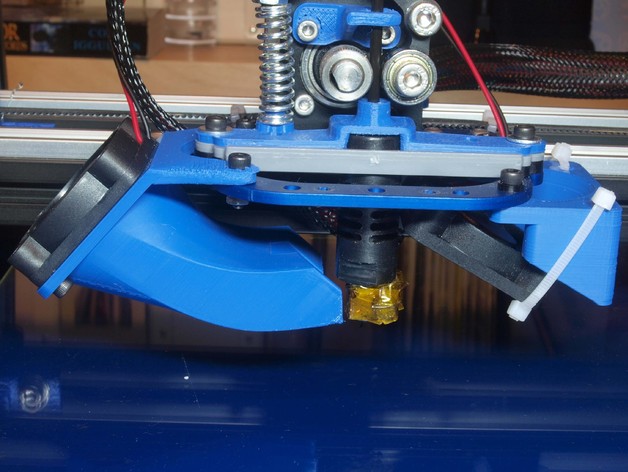
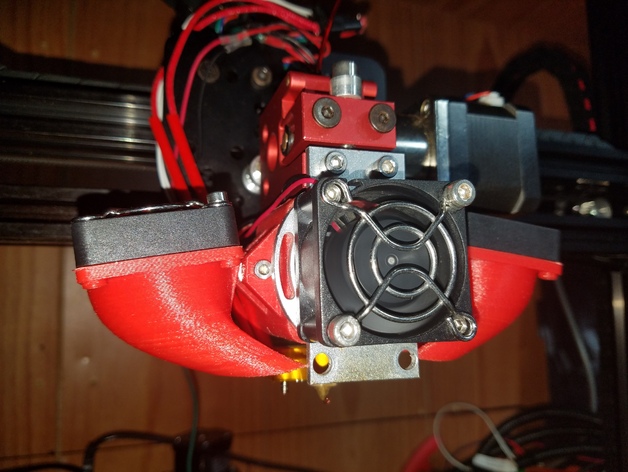
Cooling fans on 3D Printer Head
How many fans he is using on his 3D printer head?
What is each of these fans facing to?
Why is the print head fan mandatory? What happens if this fan stops working?
Where do the side fans face?
Describe what happens to the extruded plastic layers when side fans are on.
What happens to the extruded plastic layers when side fans are off. ( What will be the issues with 3D printed parts in this situation?)
What is the material and size of the calibration cubes he is printing?
Describe what happens to the shape of the cube when the side fans are off? (Can you use these cubes to calibrate your 3D printer?)
What happens to the shape of the cube when the side fans are on?
What do the measurements on two cubes prove to us?
Different configurations of using the cooling fan to blow at hot end
Describe the Marvin face when it is printed with the fans off?
What is the Glass Transition Temperature of PLA?
Cooling fans assist the plastic to …. down below …… before the next layer gets deposited.
Do you Use Cooling Fans For ABS?
What is the glass transition temperature of ABS?
Does ABS need to cool down as far as PLA?
Can ABS create ugly parts without cooling fans?
Can you always use cooling fans with ABS parts? Why?
What happens when you use cooling fans with ABS parts?
Why is he using a 50% speed for the cooling fans when he tries to print the Marvin face with ABS?
How is the quality of the printed ABS part?
Is it totally forbidden to use cooling fans for ABS parts?
Now watch and enjoy the Video
Cooling fans blowing at both sides of the hot end
Bottom Line
If your 3D printer hasn’t got side cooling fans then you are missing out a lot of quality of your PLA printed parts. So get ready to install them on either side of your printer head to blow at printed plastic layers and save the quality of your 3D printed pieces.
You will save a lot of money, material and effort, and even do more effective calibrations on your machines by following this step. So what are you waiting for?!!
Congratulations on taking another effective step towards expert 3D printing.
See you on the next post about 3D printing long bridged parts.